chntpwN
Basic experiment to bypass the windows 10 password

chnptw
chntpw is a Linux-based utility used to reset or modify local user account passwords on Windows systems by editing the Windows registry files offline. It means that chntpwn is already installed in the kali
Boot the live kali in the window machine. Before getting started, make sure to watch the tutorial video and use it as a guide to help you boot into Kali Live from a USB drive
Disclaimer: This works only on local Windows accounts and requires physical or offline access to the system disk it does not work on Microsoft online accounts or remote system. Always ensure you have explicit persmission to perform password recovery on security testing on the device. This is also known as offline password attack.
Windows login protection normally prevents password changes without authentication.
However, if someone has physical or offline access to the disk, they can modify the SAM database directly.
First, list all the disk in the machine using this command
1
2
3
4
5
6
7
8
9
10
11
12
13
┌──(kali㉿kali)-[~]
└─$ lsblk
NAME        MAJ:MIN RM   SIZE RO TYPE MOUNTPOINTS
loop0         7:0    0   4.1G  1 loop /run/live/rootfs/filesystem.squashfs
sda           8:0    1 115.4G  0 disk
├─sda1        8:1    1  85.4G  0 part /run/live/medium
├─sda2        8:2    1    30G  0 part /run/live/persistence/sda2
└─sda3        8:3    1     1M  0 part
sr0          11:0    1  1024M  0 rom
nvme0n1     259:0    0    15G  0 disk
├─nvme0n1p1 259:1    0   200M  0 part
├─nvme0n1p2 259:2    0   128M  0 part
└─nvme0n1p3 259:3    0  14.7G  0 part
The window partition should be nvme0n1p3. since this is just a virtual machine, the storage is just 14.7G. Create the file and mount the window partition. If you want to confirm that is the partition, run this command.
1
2
3
sudo mkdir /mnt/win
sudo mount /dev/nvm0n1p3 /mnt/win
ls /mnt/win
Then you will see bunch of windows file just like the image below.

If it didn’t work you can use this command to mound the file.
1
sudo mount -o remove_hiberfile /dev/nvme0n1p3 /mnt/win
Then navigate to this folder. We navigate to this folder because it contains the Windows account database files needed to reset or analyze passwrods. For windows 10, the local user credentials are sotred in registry hive files located in Windows/System32/config
1
└─$ cd /mnt/win/Windows/System32/config
The tool works by edting the SAM database directly. Now we we want to look the list of the user of this machine
1
─$ sudo chntpw -l SAM
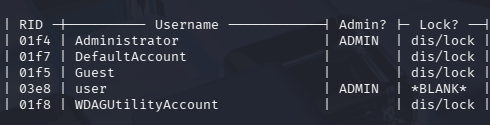
Next command should be and make sure to modify the username to username you want password to reset or update. In this case, we will be using username “user”
1
2
3
4
5
6
7
8
9
10
11
sudo chntpw -u <username> SAM

- - - - User Edit Menu:
 1 - Clear (blank) user password
(2 - Unlock and enable user account) [seems unlocked already]
 3 - Promote user (make user an administrator)
 4 - Add user to a group
 5 - Remove user from a group
 q - Quit editing user, back to user select
 Select: [q] > 1
Password cleared!
Select 1 to reset the password. As a result, Windows no longer has a stored password hash to verify during the login process. Therefore, the system treats the account as having a blank password, allowing you to log in directly and regain access to the machine.
One important takeaway from this lab is that offline password attacks, such as using chntpw from a Linux live USB to reset local Windows passwords, are possible only if the drive is unencrypted.
By enabling BitLocker, Windows encrypts the entire drive, including the SAM database that stores local account passwords